Everything you need
to get going
with Ethira
A friendly walkthrough of the features every Ethira user should know — from your first sign-in to managing vendors, risks, and your team. Keep it open during onboarding, or share it with a new colleague.
Discover
See every AI tool and vendor already in use across your org.
Onboard
Assess and approve new vendors with guided due diligence.
Monitor
Stay ahead of incidents, breaches, and changes in real time.
Prove
Turn your work into audit-ready reports and exports.
Ethira gives you one clear view of every AI tool, agent, and vendor your organization relies on — and the workflows to onboard, monitor, and report on them with confidence.
This guide is your single reference for the things every user should know. Each part explains what a feature does and how to use it, in plain language. You don't need to read it front to back — jump to whatever you need from the menu on the left.
Sign in
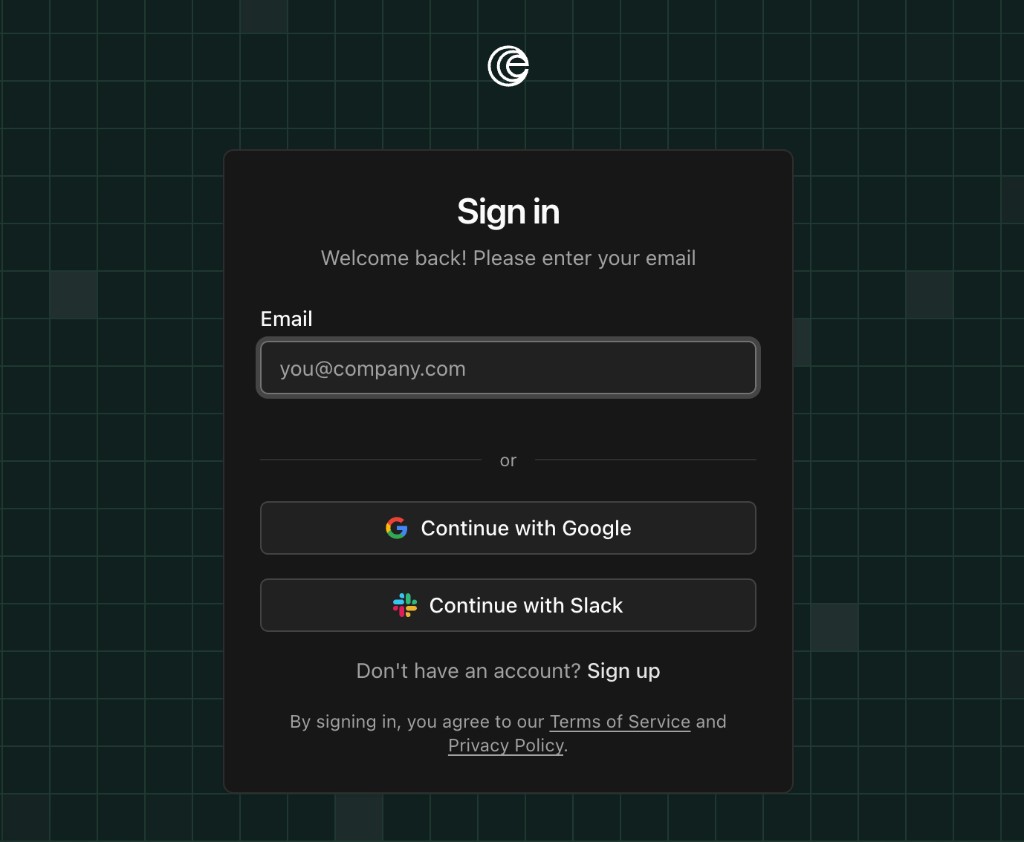
Open the Ethira link your organization shared with you, then sign in with whichever method your team uses. Any of these will take you straight to your workspace:
- Email & passwordEnter your credentials and select Sign in.
- Sign in with GoogleChoose the Google option and approve access with your Google account.
- Single sign-on (SSO)If your administrator set this up, you'll be sent to your company login to authenticate — no separate password to remember.
Set up your workspace
The first time you sign in to a brand-new workspace, Ethira walks you through a short setup. Two quick steps and you're ready to go:
- Name your organization. Add your organization name and country. Ethira confirms your details and creates your workspace.
- Invite your team. Add the email addresses of colleagues who should join. Each person gets an invitation in their inbox.
When you finish, you land in the main app with your workspace ready to use. You can always change any of these choices later.
To choose the compliance templates that shape your due-diligence questions, head to Third Parties → Settings and select Questionnaires. From there you can enable the questionnaire templates used when you onboard a vendor.
Your overview dashboard
When you sign in you land on Third Parties → Overview — your operational snapshot of how your vendors, risk, and monitoring are doing at a glance.
What's on the overview
- Lifecycle counts — how many third parties sit at each stage, from discovered through to onboarded.
- Ecosystem graph — a visual map of how your vendors and their subcontractors connect.
- Concentration risk — your most depended-upon vendors, so you can see where a single failure would hurt most.
- Risk distribution — how risk is spread across your onboarded vendors.
Monitoring & the weekly digest
The Monitoring card tracks security events — incidents, outages, and breaches — across your vendors over the last 30 days. Click any tile to open the full feed, or filter straight to data breaches. The weekly security digest is an AI-written summary of the week's events, ready for leadership briefings and Monday triage. Curious about any event? Ask the Agent for context or next steps.
Jump into your risks
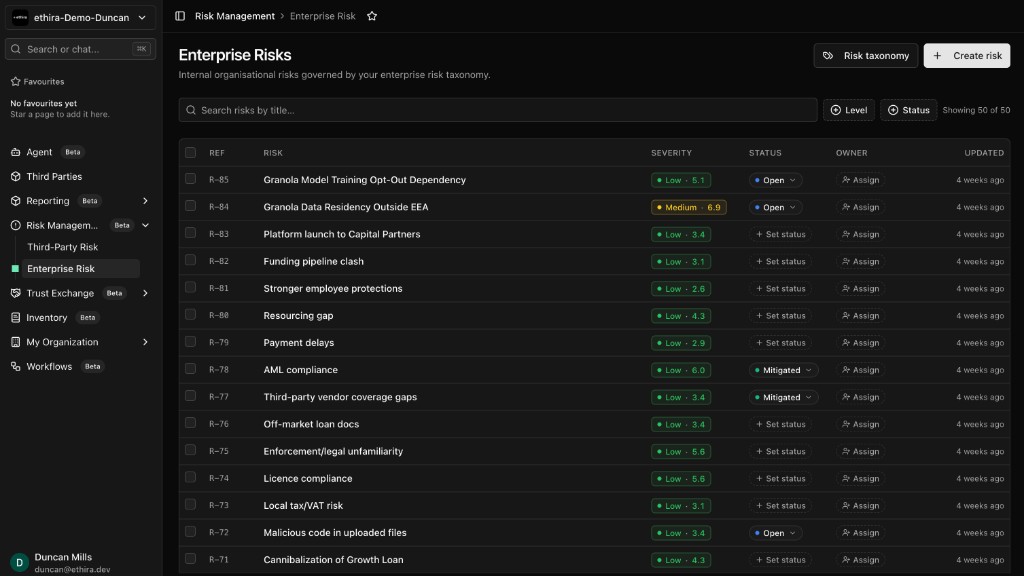
For the full risk picture, head to Risk Management — your enterprise and third-party registers, each with its own triage inbox, scoring, and the risks assigned to you.
Meet the Ethira Agent
The Agent is your AI assistant, ready in the left menu under Agent. Ask it anything in plain language. If your team connects Slack, you can mention @ethira there for the same help.
Open Agent, start a conversation, and type your request. It knows this guide inside out, so it can answer how-to questions, point you to the right page, and — when you have permission — get things done for you. A few things people ask it every day:
Whether you need a quick answer, a document summarized, or a task handled, the Agent is usually the fastest way to get there.
Add & discover vendors
Every vendor moves through the same simple journey — knowing where a vendor sits tells you what to do next.
- DiscoveredSpotted in use across your org, but not formally added yet.
- Pre-screeningA quick AI due-diligence check before you commit.
- OnboardingThe full guided review is underway.
- OnboardedAn active relationship you're managing day to day.
- InactiveThe relationship has ended and is archived.
Add a vendor
The standard way to bring a vendor in:
- Go to Third Parties in the left menu.
- Start a new vendor: click New on the Pre-Screening tab to begin pre-screening, or click New Third Party on the Onboarding or Onboarded tab.
- Enter the vendor's website and choose Find Services.
- Pick the matching service from the results to create the relationship.
- Follow the guided steps until the vendor reaches Onboarded.
Let Ethira find them for you
Ethira can surface vendors automatically by scanning public sources and signals from your environment — through the browser extension, the CLI, or connected tools like Google Workspace. New finds land in the Discovered tab, where you can start a pre-screen, add them, or dismiss the ones you don't need.
Pre-screening & bulk import
A pre-screen runs a dozen automated checks — things like certifications, data residency, financial health, and recent incidents — so you can decide whether to onboard before investing more time. Need to add a lot of vendors at once? Bulk import lets you upload a spreadsheet and Ethira enriches and creates the records for you. And every vendor document lives together in one searchable Documents area.
Manage a vendor
Once a vendor is onboarded, open its profile to manage the relationship. Find it under Third Parties → Onboarded, then click the vendor's name. Inside, a set of sections covers everything you'll touch:
- Corporate dataThe vendor's legal entity, official identifiers, and corporate profile.
- Contractual dataContract terms, key dates, and commercial details.
- Business functionsThe business functions and services this vendor supports.
- Data processingWhat personal data the vendor processes, and how.
- SubcontractorsThe vendor's subprocessors and fourth parties.
- OutagesReported service outages and availability incidents.
- Data breachesKnown breaches affecting this vendor.
- DocumentsContracts, policies, and certifications, all in one place.
- Contract analysisAn AI review of the contract against your requirements — GDPR, DORA, the EU AI Act, and more.
- Risk analysisThe risks tied to this vendor and the controls that address them.
- QuestionnairesDue-diligence questions with AI-drafted answers you can accept, edit, or send to the vendor.
- DORA RoI IssuesGaps to resolve so this vendor is ready for your DORA Register of Information.
- SanctionsSanctions and watchlist screening results for the vendor.
- ActivityThe audit trail of changes and events for this vendor.
At the top of the profile, a Background processes bar shows Ethira's automated work on this vendor — open View details to watch each task, or use Restart to re-run the onboarding. The Timeline button shows the full history of changes.
To remove a vendor or export your data, head back to the Onboarded list: each row's ⋮ menu includes Delete vendor (with a type-to-confirm step), and you can filter the list to a single vendor and select Export for a spreadsheet — or download a vendor's files from its Documents section.
Handy to know. The Agent starts filling these details in automatically as soon as onboarding begins, so a profile is already taking shape before you touch it. It can also fill in a vendor's official company identifiers for you — just ask it to look up and add the details, and they'll flow straight into your exports.
Stay on top of risk
Your risk register lives under Risk Management. Risks are grouped by category and severity — Critical, High, Medium, Low — and every risk carries an owner and a status, so it's always clear what needs attention and who's handling it. Switch between Active, Suggested, My risks, Team, and Closed from the views at the top.
- Review AI-suggested risks and Approve the ones worth tracking — approved suggestions become active risks, while the ones you Reject move to Closed.
- Create your own with New → Add Risk — give it a title, category, owner, and an inherent risk level, then track its status through to Closed.
- Add mitigations — the controls that bring a risk down. As they take effect, the residual level drops below the inherent level (it can never sit above it).
- Filter to My risks for what's assigned to you, or Team to see what your colleagues own.
People & approvals
Ethira is built for teams. Bring colleagues in, give them the right level of access, and route key decisions to the right people.
Invite your colleagues
Go to My Organization → Users, select invite, and enter an email — they'll get a link to join. Prefer to skip the clicks? Just ask the Agent: "Invite jordan@example.com to the workspace."
Roles, made simple
- ViewerRead-only access across the sections they're allowed to see.
- MemberHands-on day-to-day work with vendors, risks, and documents.
- AdminFull control over how the workspace is set up.
Need something more specific? Admins can create custom permission groups for finer control.
Approvals you can trust
Onboarding a vendor and certain governance steps need sign-off. The vendor header shows who has approved, who's still pending, and — via the clock icon — a full history of every approval, with who did it, when, and any comments. Nothing important happens without a clear paper trail.
Get help & what's next
If you can't find something in this guide, the fastest answer is usually the Agent — it has this whole manual at its fingertips and replies in real time.
From the menu at the bottom of the sidebar you can also send feedback to share ideas or report something, peek at the roadmap to see what's coming, and check the changelog for what just shipped. We're always building, and your input shapes where we go next.
Find your guide
Not every team uses Ethira the same way. Choose the guide that matches your role — or stay on this page for the essentials everyone should know.
Procurement & TPRM
Vendor lifecycle, onboarding workflows, and third-party risk for procurement teams.
GRC & compliance
Risk registers, mitigations, and compliance workflows for GRC officers.
Legal, privacy & DPO
Processing activities, impact assessments, and privacy operations.
Security & CISO
Shadow IT discovery, access reviews, and security governance.
DORA & regulatory
Register of Information, ICT risk, and financial regulatory reporting.
Platform & DevOps
Inventory, integrations, MCP servers, and platform engineering.
Workspace administrators
Users, roles, SSO, workspace settings, and organization setup.
Ready when you are
You've got the essentials. Sign in, invite your team, and let Ethira show you what's running in your org.