Get to a clean
Register of Information,
without the last-minute scramble
A practical guide for DORA programme leads, operational resilience teams, and regulatory reporting owners. Model your organization, keep vendor ICT data export-ready, fix gaps before they bite, and produce your Register of Information with confidence.
Model
Set up entities, branches, and functions.
Enrich
Keep each vendor's ICT data complete.
Validate
Clear every blocker before you export.
Export
Generate the Register of Information.
DORA reporting comes down to one outcome: a complete, accurate Register of Information you can hand to your regulator. This guide walks the path there — model your organization, keep vendor data export-ready, fix the gaps, and generate the register.
Read it in order if you're setting DORA up for the first time, or jump straight to whatever you're working on. The Agent can help at any step.
DORA features are turned on for you. When DORA is active for your workspace, you'll see branches, functions, the DORA RoI Issues section on each vendor, and the DORA RoI section under Reporting. If you expect these and don't see them, your Ethira account team can switch them on — it isn't a toggle you flip yourself.
Model your organization
Your register starts with how your organization is described in My Organization — the entities that hold contracts, where they operate, and what they do.
Legal entities
These are the corporate units that consume and contract ICT services. Add each one with its name, country, and regulatory identifiers like LEI, then set its structural type — stand-alone entity, subsidiary, branch, holding company, joint venture, and so on.
For the entities in scope for DORA, flip the Financial entity switch and pick the classification that matches — credit institution, payment institution, crypto-asset service provider, and the rest. That classification flows straight into your register. You can leave it blank until your competent-authority code is confirmed.
Branches
Branches are the physical or operational locations tied to a legal entity, used to show where ICT services are actually consumed. Add each branch with its address and country and link it to its parent entity — they'll appear in your compliance and usage reporting.
Business functions
Functions describe what your organization actually does — payment processing, customer support, data analytics — and carry the recovery detail regulators expect:
- Add a function with a name, description, and the unit that owns it.
- Record its Recovery Time and Recovery Point objectives in hours (so one hour is "1").
- Set the discontinuation impact and explain your reasoning — auditors read this.
- Link functions to the vendors that support them, during onboarding or in the vendor's Business Functions section.
Every change to a function is tracked in its history, so you can always show how a figure was reached.
Intra-group services
Not every ICT provider is an outside vendor. DORA wants the services your group provides to itself, too — shared platforms, internal data centers, group SSO, treasury systems.
To capture these, turn on "Is also a service provider" on the relevant legal entity, and it becomes available as an intra-group provider. Then record which entity provides which service to which other entity from the Service Providers and Relationships tabs in Third Parties. These internal relationships feed your register right alongside your external vendors, so the picture is complete.
Vendor DORA data
With DORA on, every onboarded vendor gains a set of regulatory sections. Keeping these current is what makes export day painless.
- Business FunctionsLink the business functions this vendor supports and confirm how critical the relationship is — this maps their ICT services to your operations in the register.
- SubcontractorsDeclare the vendor's own providers (your fourth parties). Review what AI discovered or add them yourself, and set the ICT service type for each.
- DORA RoI IssuesYour per-vendor readiness check — see exactly what's blocking export for this relationship and complete the regulatory fields, grouped into clear sections.
Classify the ICT service
Tag what kind of ICT service each relationship provides — cloud software, network infrastructure, and so on — on the vendor and on each subcontractor link. You can filter your subcontractor list by service type to audit your coverage at a glance.
Decide what's in scope
You control whether a relationship appears in the register. From a vendor's actions menu, choose Include or Exclude from DORA RoI. Excluded vendors stay in your portfolio but sit out of the export — useful for relationships that fall outside DORA's scope.
Per-product detail, when you need it. If your workspace has the System Functions option enabled, you can attach business functions to individual systems under a vendor — handy when criticality differs product by product. Your register pulls both vendor-level and system-level detail together automatically.
DORA in onboarding
When DORA is on, bringing in a vendor automatically gathers the regulatory data along the way — so you're not back-filling later.
- ScreeningChoose which part of your organization is taking on the service.
- Basic informationEthira gathers the vendor's ICT service details alongside the usual company profile.
- FunctionsLink the business functions this vendor supports — required for the register.
- Approval & monitoringSign-off makes the relationship active; readiness checks surface any export blockers, and DORA fields stay editable afterward.
Once a vendor is live, keep its register data fresh in the DORA RoI Issues, Subcontractors, and Business Functions sections — and clear any workspace-wide gaps from the tools in the next section.
Fix gaps before export
Most of the work is closing the small gaps that would otherwise block a clean export. Ethira surfaces every one and, where it can, fixes it for you.
Pending Issues
Pending Issues lists every validation blocker — the missing field, the record it affects, and how serious it is — with a live count in the navigation so you always know how close you are. Click any issue to jump straight to the record. For each one you get two kinds of help:
Auto fix hands the issue to the Agent, which can look up identifiers, find subcontractors, search the web, and update the record itself — then you watch it work. It's available for vendor and subcontractor issues; for legal-entity and business-function records, you edit those directly.
Incomplete Entities
The Incomplete Entities view is your missing-field dashboard — every vendor, entity, and record with a gap, in one place. Work down the list, editing inline where you can, until it's empty.
Keep parents tidy
Your register reads from ultimate parent entities too. Keep their legal names, identifiers, and headquarters current under Third Parties → Ultimate parents — and if an identifier is missing, just ask the Agent to fetch it and write it to the profile.
The Register of Information
Everything you've set up comes together in the DORA RoI hub under Reporting. The path to a clean export is the same every reporting period:
Review and export
On Export Preview, check the full register against DORA's requirements and export when validation passes. Clearing your pending issues first gives you a clean run — though you can export with errors when that's explicitly allowed. Every export is kept in your history with the file, who ran it, when, and a snapshot of the relationship count and open issues at the time, so you always have the audit trail.
Map where services are used
The ICT Service Usage view ties each contract to the branches where the service is actually consumed — assign the relevant locations to each row and that part of your register fills itself in.
Bringing in existing data
Migrating from another tool, or carrying over a prior reporting period? The import wizard loads existing register data from an XBRL-CSV file, so you don't start from scratch.
Supply-chain visibility
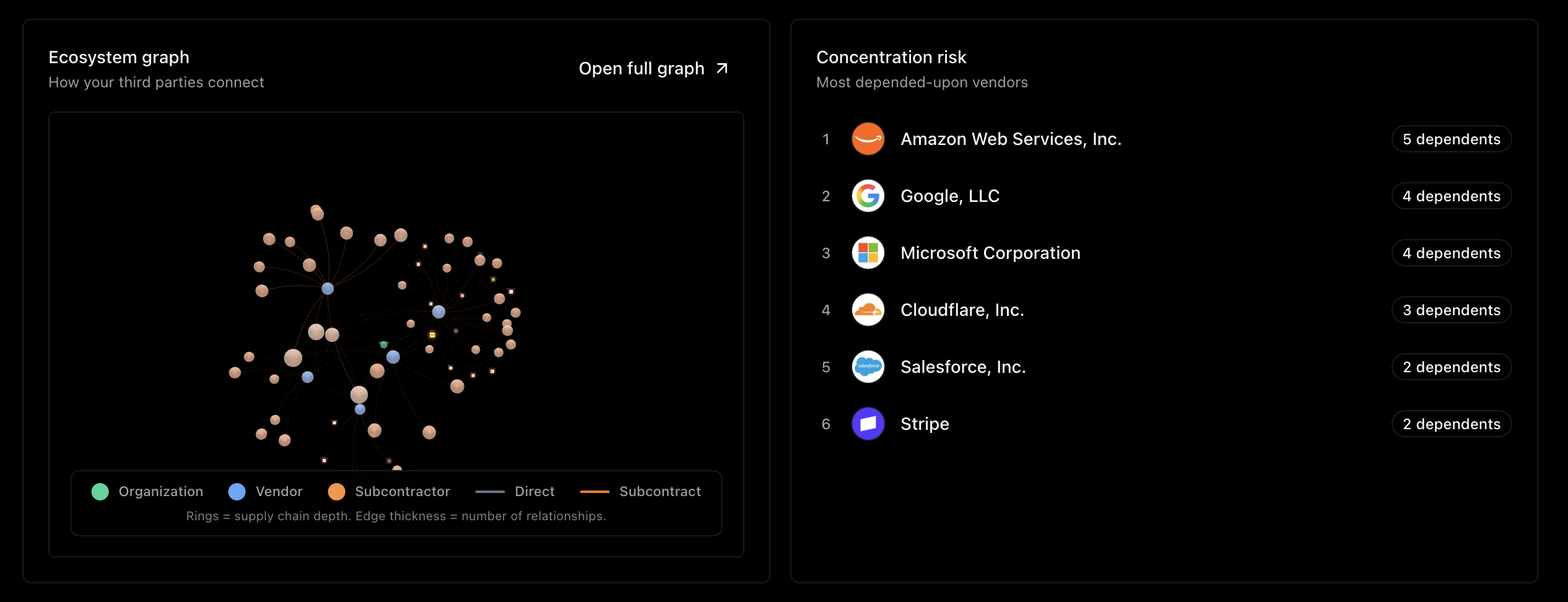
DORA expects you to understand your fourth-party exposure and concentration, not just your direct vendors. Three views give you that picture:
- Dependency graphAn interactive map of your vendors and their subcontractors — see the chains and where they converge.
- SubcontractorsYour portfolio-wide fourth-party list, with a bulk "fix missing fields" tool to backfill required DORA detail fast.
- Vendor list exportA one-click Excel export of your filtered third-party list with their identifiers and relationship detail — the auditor sample they'll ask for.
Get help & what's next
The Agent is the fastest way through DORA's fiddly fields — it knows your register and can research and fill data for you. A few prompts that fit:
You're set for reporting season
Model it once, keep the data fresh as you go, and let Ethira surface and fix the gaps — so the register is ready when the deadline is, not the night before.