See every tool,
catch every signal,
before it becomes an incident
A practical guide for CISOs, security engineers, and IT teams. Monitor vendor posture, catch shadow IT and data leaving the org, govern the AI tools your developers connect, and run security risk work — all in one place.
Monitor
Watch vendor incidents, breaches, and outages in real time.
Detect
Surface shadow IT and data leaving the organization.
Govern
Approve the AI tools and MCP servers in use.
Remediate
Turn findings into tracked risk and dev tickets.
This guide is for the people who have to answer "what's actually running in our environment, and is any of it a problem?" — watching vendor posture, catching tools nobody approved, governing the AI your developers wire up, and turning all of it into action.
Read it in any order, and lean on the Ethira Agent whenever you'd rather ask than dig through screens.
New to Ethira? Start with the platform basics — signing in, navigation, the dashboard, and the Agent. For the third-party risk register and enterprise risk, the procurement & TPRM and GRC guides go deeper.
Continuous monitoring
Ethira watches your vendor portfolio for security incidents, outages, breaches, and certification changes — across your whole portfolio on the Third Parties → Overview page, and per vendor on each profile.
The portfolio view
The Third Parties → Overview page is your security operations starting point:
- Monitoring cardTotal, critical, data-breach, and outage event counts across your vendors and subcontractors over the last 30 days.
- Event feedClick any tile to open the full stream of incidents, outages, and breaches, newest first — or filter straight to breach-only events.
- Weekly security digestAn AI-written summary of the week's events — ready-made for leadership briefings and Monday triage.
- Concentration & risk distributionSee your most depended-upon vendors and how risk is spread across the portfolio at a glance.
Ethira refreshes this monitoring automatically every day, so the feed stays current without anyone pressing a button.
The per-vendor view
Open any vendor and the Outages and Data breaches sections give you a full timeline of what's happened to them. Security evidence like SOC 2 and ISO 27001 is captured alongside the vendor's Documents, so the proof sits next to the risk it covers.
Catch it before onboarding. A pre-screen checks a vendor for known breaches, outages, and incidents before you ever commit — and newly discovered tools can be pre-screened automatically the moment they cross the radar.
Shadow IT & data exfiltration
Ethira surfaces the tools your team is actually using — long before they show up in a vendor register — and flags where personal data may be leaving the organization.
How the signals get in
Several channels feed the same picture, so nothing hides:
- Browser extensionDeploy it across managed browsers and every tab becomes a risk signal — recording the tools in use, the sign-ins (which identity provider, which app), and any embedded third parties like analytics or CDNs.
- PII detectionWhen data matching tracked categories — email, phone, payment card, health — is submitted to a site, Ethira records the destination so you can see where sensitive data is going.
- Integration scansPull tools in use straight from connected systems like Vanta and Google Workspace.
- Ethira CLIFor engineering-led inventory — repositories, systems, and deployment signals that never touch a browser tab.
The Discovered list
Everything lands on the Discovered tab, where each tool shows its category, how strong the usage signal is, a risk verdict, how many people are using it, and — crucially — which kinds of personal data have been seen going to it. That PII column, paired with the risk verdict, is your front line for spotting data exfiltration and unsanctioned AI tools.
Act while you triage
You don't have to wait until a tool is fully reviewed to control it. Apply enforcement straight from the list:
And when someone starts using an unapproved tool, a Slack alert can land in your channel with the vendor domain and risk tier. Alerts are anonymized — individual employees are never named.
Govern AI tooling
Developers connect AI tools to data through MCP servers. Ethira gives you a clean request-and-approve loop so nothing gets wired up without security's sign-off.
- Set up a request channel so developers can ask for an MCP server right from Slack, with a business case.
- Each request becomes a Requested entry in Inventory → MCP Servers, with who asked and why.
- Open the request to review the endpoint and business case — Ethira even matches the endpoint to an existing vendor where it can — then approve or reject with a comment.
Every decision is kept permanently, with who made it and when, so you always have the record of what was approved and why.
Agent observability
Approving an AI agent is the start — knowing what it actually does at runtime is the rest. Ethira can stream behavior from your code-resident agents into one place, alongside browser and CLI signals.
Register an agent in your inventory, drop the Ethira SDK into your orchestration — LangChain, LangGraph, OpenAI Agents, a custom MCP server, or your own — and its activity flows in within seconds: which tools it called, which dependencies it declared, and the policy decisions it made.
Each agent gets its own scoped access, kept separate per environment, so a leaked credential can never speak for another agent or workspace. Pair this with your Discovered list and access reviews for end-to-end oversight of both vendors and AI tools.
Access reviews
Periodically confirm who has access to each vendor, and at what level — the recurring attestation auditors ask for, made quick.
Access Review is off until you switch it on in your workspace settings. Once enabled, open Access Review, pick a vendor, and for each person set an access level and confirm. Every confirmation stamps the vendor's "last reviewed" date and writes to the activity log, so your attestation history builds itself.
- Your own access levelsCreate labels that fit each vendor — Admin, Editor, Viewer, or whatever your team uses — right from the review page.
- A clear "No access"Record that someone shouldn't have access at all; they stay on the list with a tag for audit visibility.
- Smart user listsEthira assembles who to review from your workspace people, external addresses the browser extension spotted on the vendor's domain, and anyone you've reviewed before.
Security risk work
Findings only matter if they turn into action. Ethira connects vendor and enterprise risk to your assets and your dev workflow.
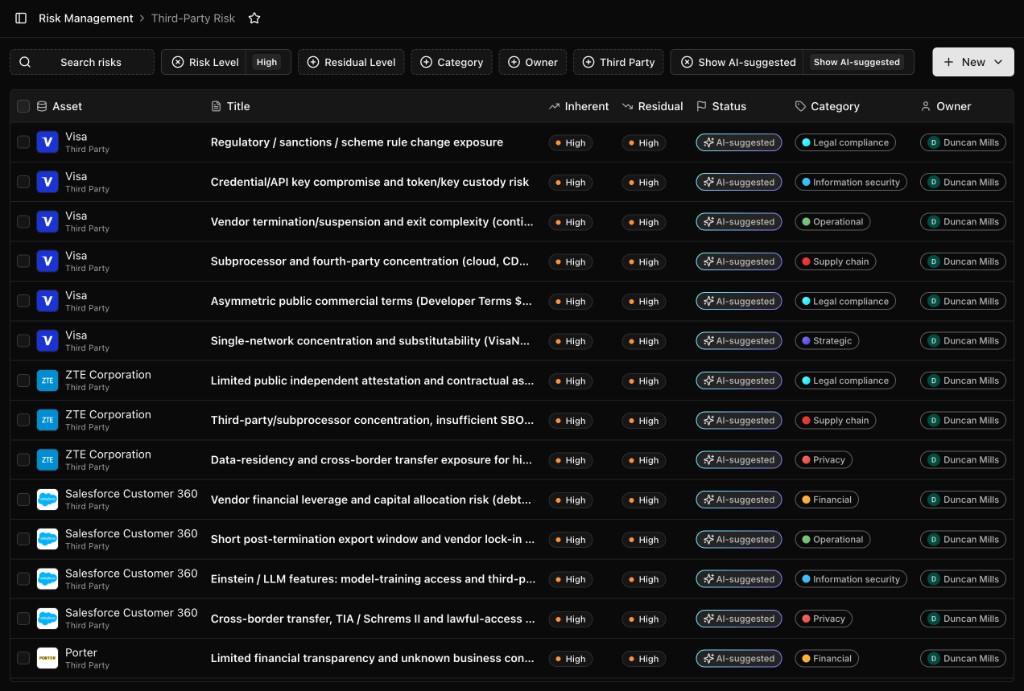
Security teams work across two registers — third-party risks for vendor-linked exposure, and enterprise risks for portfolio-wide information-security risk. On any onboarded vendor, run an AI risk assessment for a narrative summary, individual risks with severity, and suggested mitigations; re-run it whenever new documents or answers come in.
- Link risks to assetsConnect a risk to the products, systems, datasets, and agents it touches — instant blast-radius context, and it flows into concentration analysis.
- Track remediation in Jira or LinearSpin a mitigation into an issue in your dev backlog; status syncs back from Jira automatically.
- Contract analysis for security gapsCheck vendor contracts against security and regulatory requirements — NIS2, EBA ICT, DORA, and your own custom items.
Integrations
Ethira plugs into the security stack you already run. The ones worth wiring up first:
- VantaSync compliance posture and feed tool discovery.
- SlackShadow-IT alerts, MCP requests, and Agent posting.
- SSO & SCIMSAML sign-on and automated user provisioning.
- Jira & LinearMitigation tracking with status sync.
- API keysScoped programmatic access for your automation.
- MCP serverConnect Claude, Cursor, VS Code, or the CLI to your workspace.
Get help & what's next
The Agent is the quickest path through most security operations — it knows your environment and can act on your behalf. A few prompts that fit:
You're set to run security ops
See what's running, catch what shouldn't be, govern the AI in the loop, and turn it all into tracked action — with Ethira doing the watching in between.